Cloudflare Now Lets You Crawl the Web - The Same Company That Spent Years Stopping You
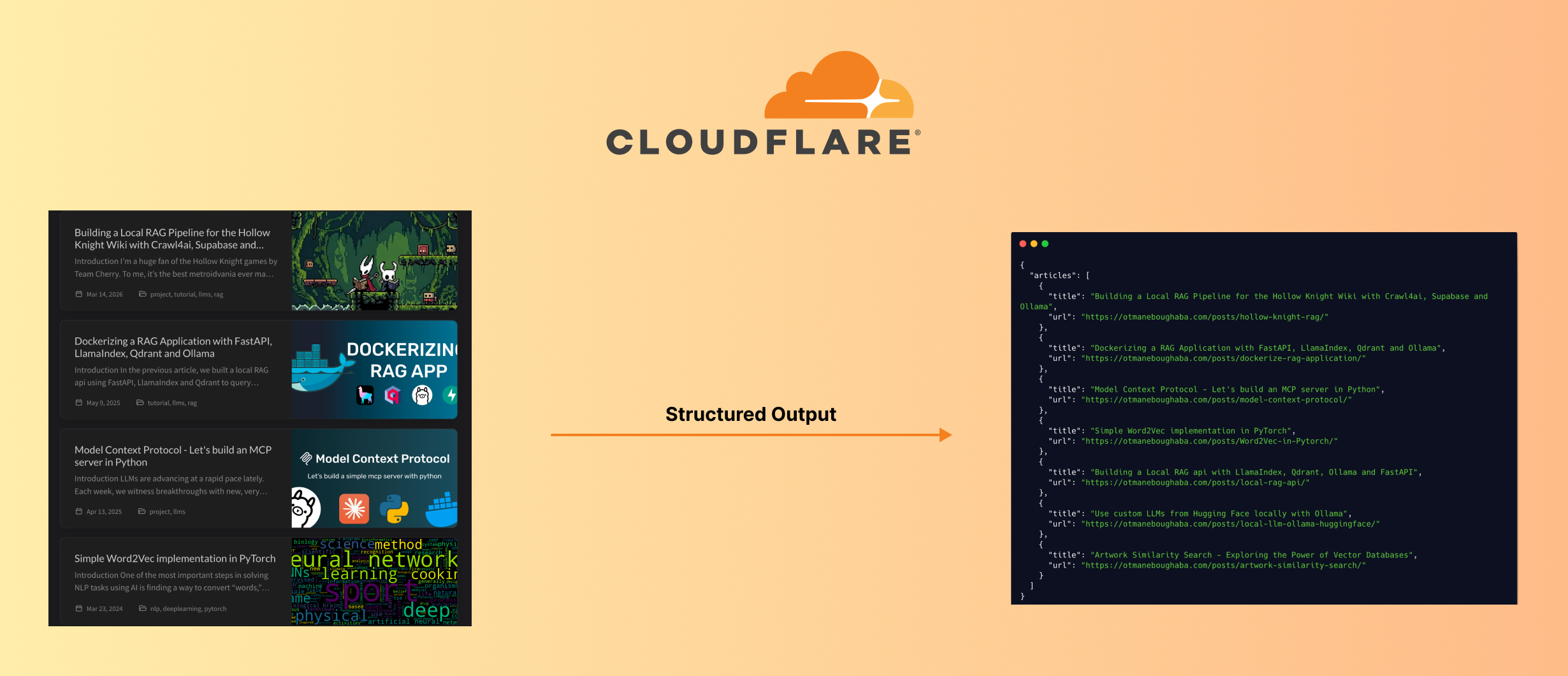
Cloudflare spent years building tools to block AI scrapers. Bot protection, Turnstile, rate limiting… the whole arsenal. And now, quietly, they’ve shipped a Browser Rendering REST API that lets you crawl and extract structured data from any website.
Let’s see what it can actually do.
What Is Cloudflare Browser Rendering?
Cloudflare Browser Rendering spins up a real headless Chromium browser on Cloudflare’s edge infrastructure. Because it runs a real browser, it handles JavaScript-heavy pages, SPAs, and dynamically loaded content, which used to break simple scrapers.
The REST API exposes several endpoints:
/crawl: recursively crawl an entire website/json: extract structured data using AI/markdown: convert a page to clean Markdown/screenshot: capture a screenshot/scrape: scrape specific HTML elements/content: fetch raw HTML
NOTE: It still respects
robots.txt. So it won’t crawl pages that have opted out.
In this article we’ll try some of these endpoints and see what the output looks like.
Setup
Get your Account ID
Log in to dash.cloudflare.com, go to Compute → Workers & Pages in the left sidebar. Your Account ID is listed under Account Details on the right.
Create an API Token
Go to dash.cloudflare.com/profile/api-tokens and create a new token with the Browser Rendering - Edit permission.
Part 1: Crawling an Entire Website with /crawl
The /crawl endpoint recursively crawls a website up to a configurable depth and limit, and returns the content of each page in multiple formats (Markdown, HTML, screenshot, etc.).
Initiating a Crawl
1
2
3
4
5
6
7
8
9
10
11
12
13
14
15
16
17
18
19
20
21
22
import requests

account_id = "your_account_id"
api_key = "your_api_key"

response = requests.post(
    f"https://api.cloudflare.com/client/v4/accounts/{account_id}/browser-rendering/crawl",
    headers={
        "Authorization": f"Bearer {api_key}",
        "Content-Type": "application/json",
    },
    json={
        "url": "https://otmaneboughaba.com",
        "formats": ["markdown"],
        "limit": 50,   # max pages to crawl
        "depth": 3,    # how deep to follow links
    },
)

data = response.json()
print(data)
# {'success': True, 'result': '4da2676b-09fb-4ba5-b544-cccbe7035aab'}
The crawl is asynchronous, so you get back a job_id immediately, while Cloudflare processes the crawl in the background.
Fetching the Results
1
2
3
4
5
6
7
8
9
10
11
job_id = data["result"]

response = requests.get(
    f"https://api.cloudflare.com/client/v4/accounts/{account_id}/browser-rendering/crawl/{job_id}",
    headers={
        "Authorization": f"Bearer {api_key}",
        "Content-Type": "application/json",
    }
)

results = response.json()
For heavy tasks, the results of this job_id may not be available immediatly, so a loop would be requied to keep checking for when
results["result"]["status"] == "completed"
Response Structure
Each record in the response contains the URL, metadata, and full Markdown content of a crawled page:
1
2
3
4
5
6
7
8
9
10
11
12
13
14
15
16
17
18
19
20
21
success: bool
result:
  id: str
  status: str
  browserSecondsUsed: float
  total: int
  finished: int
  skipped: int
  records:
    [list of N]
      url: str
      status: str
      metadata:
        status: int
        title: str
        url: str
        lastModified: str
        og:type: str
        og:title: str
        og:description: str
      markdown: str
Example: Get All URLs
1
2
for record in results["result"]["records"]:
    print(record["url"])
1
2
3
4
5
6
7
8
9
https://otmaneboughaba.com/
https://otmaneboughaba.com/posts/artwork-similarity-search/
https://otmaneboughaba.com/posts/local-llm-ollama-huggingface/
https://otmaneboughaba.com/posts/local-rag-api/
https://otmaneboughaba.com/posts/Word2Vec-in-Pytorch/
https://otmaneboughaba.com/posts/model-context-protocol/
https://otmaneboughaba.com/posts/dockerize-rag-application/
https://otmaneboughaba.com/posts/hollow-knight-rag/
...
Part 2: AI-Powered Structured Extraction with /json
The /json endpoint uses Workers AI to extract structured data from any webpage based on a prompt, a JSON schema, or both.
Basic Usage: Prompt Only
1
2
3
4
5
6
7
8
9
10
11
12
13
14
15
16
17
import json

payload = {
    "url": "https://otmaneboughaba.com",
    "prompt": "Get me the list of articles in the blog with their title and URL.",
}

response = requests.post(
    f"https://api.cloudflare.com/client/v4/accounts/{account_id}/browser-rendering/json",
    headers={
        "authorization": f"Bearer {api_key}",
        "content-type": "application/json",
    },
    data=json.dumps(payload),
)

print(response.json()["result"])
This works, but the response structure is unpredictable, the model decides the shape.
Better Usage: Prompt + JSON Schema
Adding a response_format with a JSON schema tells the model exactly what structure to return:
1
2
3
4
5
6
7
8
9
10
11
12
13
14
15
16
17
18
19
20
21
22
23
24
25
26
27
28
29
30
31
32
33
34
35
36
37
38
39
payload = {
    "url": "https://otmaneboughaba.com",
    "prompt": "Get me the list of articles in the blog.",
    "response_format": {
        "type": "json_schema",
        "schema": {
            "type": "object",
            "properties": {
                "articles": {
                    "type": "array",
                    "items": {
                        "type": "object",
                        "properties": {
                            "title": {"type": "string"},
                            "url":   {"type": "string"},
                        },
                        "required": ["title", "url"],
                    },
                }
            },
        },
    },
}

response = requests.post(
    f"https://api.cloudflare.com/client/v4/accounts/{account_id}/browser-rendering/json",
    headers={
        "authorization": f"Bearer {api_key}",
        "content-type": "application/json",
    },
    data=json.dumps(payload),
)

data = response.json()

for article in data["result"]["articles"]:
    print(article["title"])
    print(article["url"])
    print()
1
2
3
4
5
6
7
8
9
Building a Local RAG Pipeline for the Hollow Knight Wiki with Crawl4ai, Supabase and Ollama
https://otmaneboughaba.com/posts/hollow-knight-rag/

Dockerizing a RAG Application with FastAPI, LlamaIndex, Qdrant and Ollama
https://otmaneboughaba.com/posts/dockerize-rag-application/

Model Context Protocol - Let's build an MCP server in Python
https://otmaneboughaba.com/posts/model-context-protocol/
...
Because the schema enforces the structure, data["result"] is already a clean Python dict.
Part 3: Converting a Page to Markdown with /markdown
The /markdown endpoint fetches a webpage and returns its content as clean, structured Markdown, removing navigation, scripts, styling, and other noise.
This is useful for feeding page content into an LLM, building a search index, or just saving a readable version of an article.
1
2
3
4
5
6
7
8
9
10
11
response = requests.post(
    f"https://api.cloudflare.com/client/v4/accounts/{account_id}/browser-rendering/markdown",
    headers={
        "authorization": f"Bearer {api_key}",
        "content-type": "application/json",
    },
    json={"url": "https://otmaneboughaba.com/posts/local-llm-ollama-huggingface/"}
)

markdown = response.json()["result"]
print(markdown)
The output is well-structured: headings, code blocks, links, and lists are all preserved correctly, as you can see below.
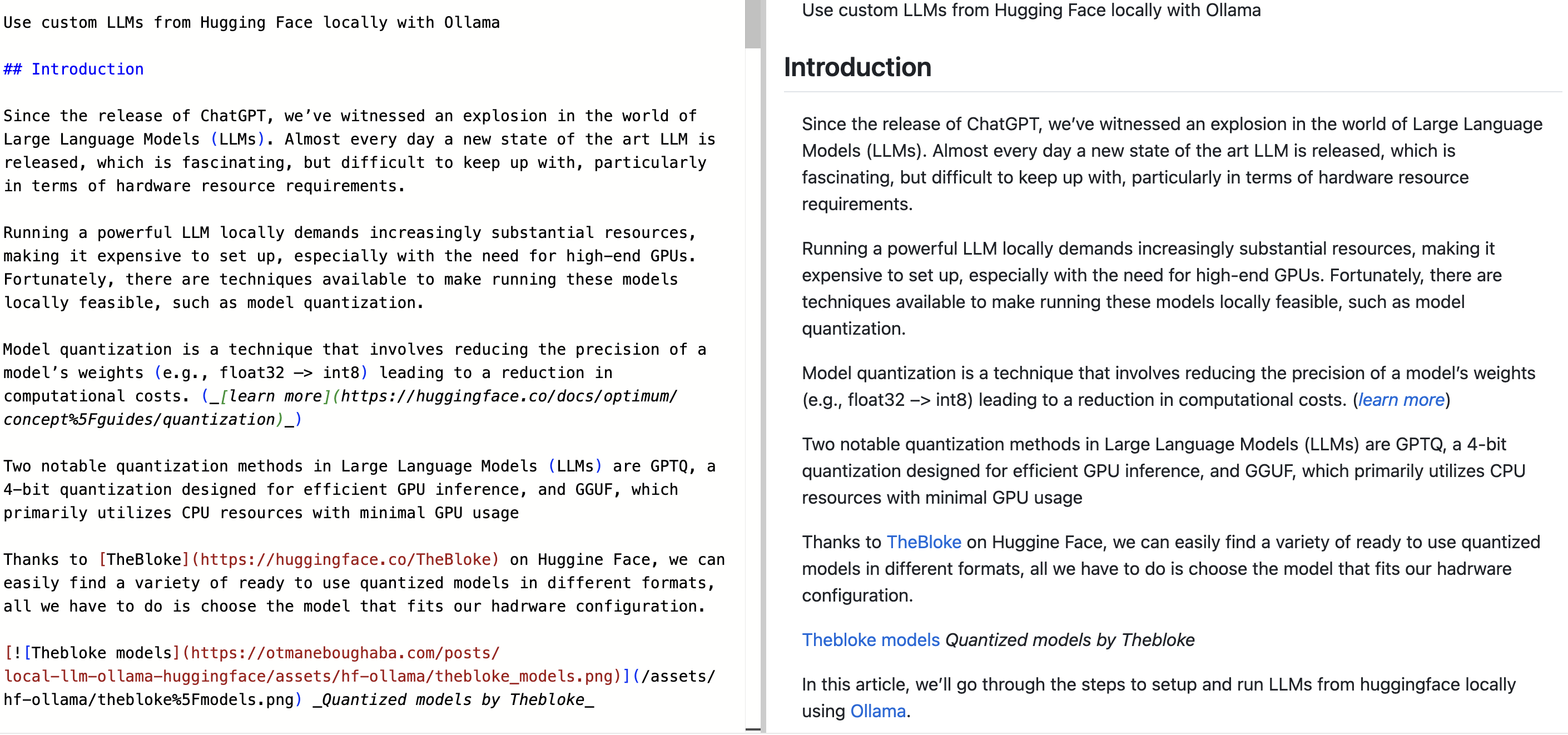
This makes it particularly useful as a preprocessing step before passing content to an LLM.
Wrap Up
Cloudflare Browser Rendering is a solid tool for structured web extraction, especially for JavaScript-rendered pages that break traditional scrapers. The full API reference is at developers.cloudflare.com/browser-rendering/rest-api. Feel free to check it out.